
How to find sensitivity is essential for getting consistent aim and better mouse control in FPS games. The right sensitivity depends on your mouse DPI, in-game settings, playstyle, and the type of game you play.
A good starting point is to choose a comfortable DPI, test different sensitivity values in your game, and adjust gradually until you can track targets smoothly and make accurate turns.
Whether you play Valorant, CS2, Fortnite, Call of Duty, or another PC game, finding a sensitivity that feels natural can improve both accuracy and overall gameplay performance.
Table of Contents
The Introduction
We’ve all been there. You tweak your mouse sensitivity, hop into a match, and your aim feels completely off—shaky one day, sluggish the next. Finding that perfect sensitivity isn’t about copying a pro player’s settings or blindly guessing numbers.
It’s about understanding the math behind your DPI, your personal eDPI, and the physical space on your desk. In this guide, I’ll walk you through exactly how to find your perfect sensitivity for games like Valorant, Apex, or CS2.
We’ll cover the flick test, tracking drills, and the muscle memory habits that lock it all in. No more guesswork just clean, consistent aiming.

Understanding the Fundamentals: DPI, eDPI, and cm/360 Explained
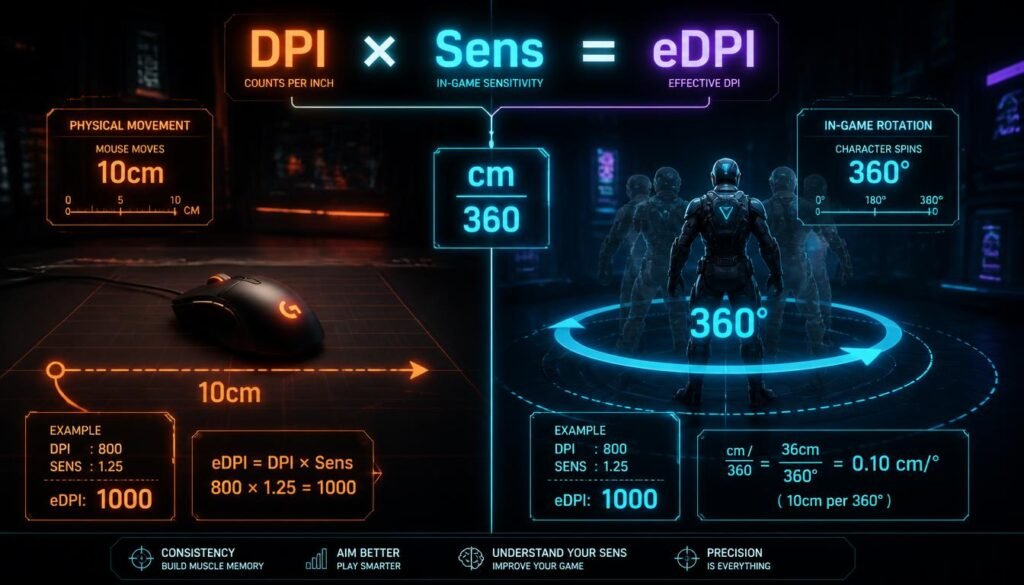
Before you start testing, let’s break down the basics. DPI is your mouse’s hardware sensitivity—most pros stick to 800. eDPI is simply your DPI multiplied by your in-game sens. It gives you a single number to compare across games.
Then there’s cm/360 the physical distance your mouse moves for a full spin. This is the real universal language. Also, turn mouse acceleration off and enable raw input so Windows doesn’t mess with your aim. Get these right, and you’re already ahead.
The Physical Setup: Wrist Aim vs. Arm Aim
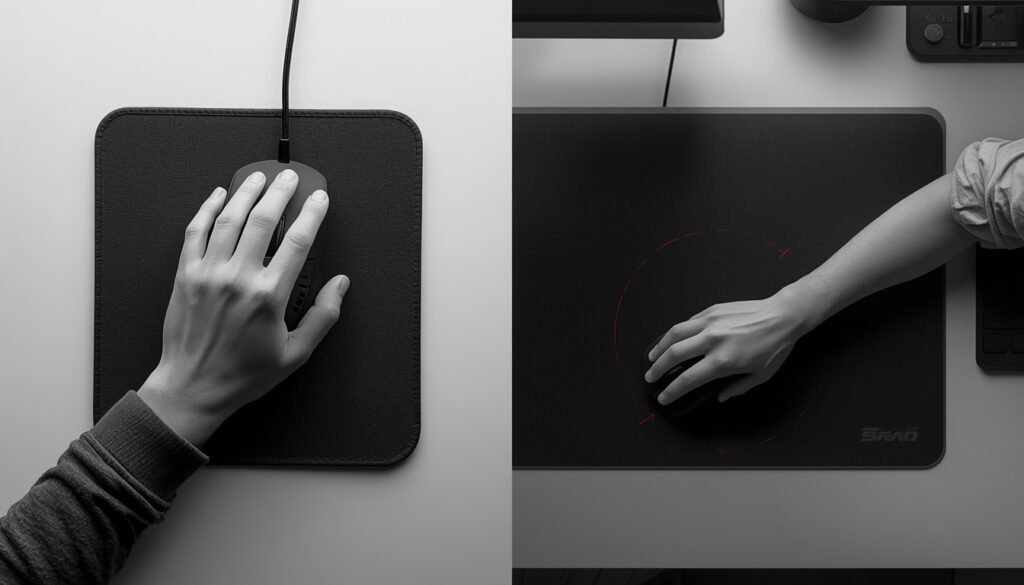
Your playstyle starts with your body. Wrist aim uses small flicks great for high-sens players but tough on your joints. Arm aim uses your whole forearm for smooth tracking and wider swipes. Which one fits you? Check your desk space and mousepad size.
Can you comfortably do a 180 turn in one motion? Also, consider your grip claw, palm, or fingertip each changes how your sens feels. Match your hardware to your natural movement, and your aim will thank you.
The Step-by-Step Method to Find Your Pure Sensitivity
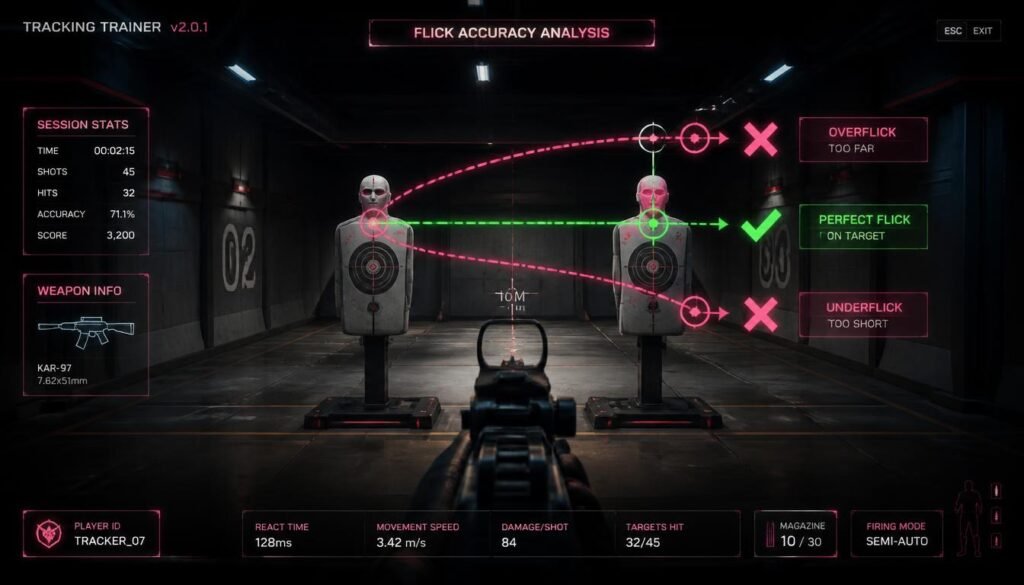
Ready to find your pure sensitivity? Start by setting your DPI to 800—the pro standard. Hop into the practice range. Pick two targets and flick between them. If you overflick, lower your sens. If you underflick, raise it.
Tweak in small steps until you’re consistently landing on target. Then, check your 180 turn—can you spin around in one smooth swipe? If not, adjust again. Repeat this sensitivity testing method until everything feels natural. That’s your number lock it in.
The PSA Method: A Data-Backed Alternative
If the basic flick test feels too loose, try the PSA method. It’s a community-favorite for finding your perfect sensitivity approximation. Start with Method A find your absolute lowest and highest usable sensitivities. Then, average them.
Next, use Method B to fine-tune from that midpoint in tiny steps. Run through the PSA test a few times until the number stabilizes. It takes a bit longer, but it gives you a mathematically grounded result you can truly trust.
Game Specific Sensitivity Ranges and Pro Benchmarks
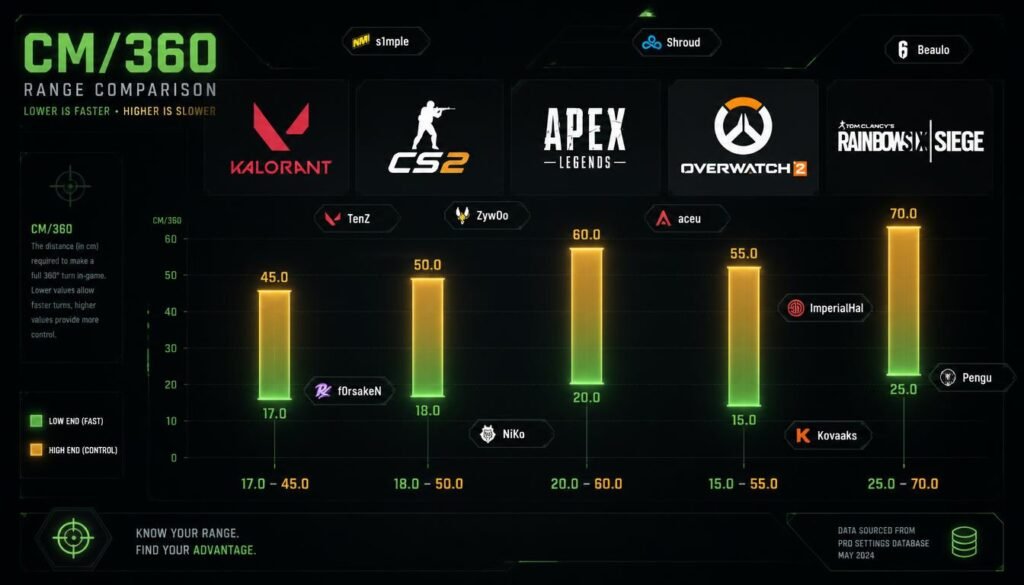
Different games demand different ranges. For Valorant and CS2, aim for 30–60 cm/360 precision matters. Apex Legends rewards fluid tracking at 20–40 cm/360. Overwatch 2 is faster try 15–30 cm/360. For Rainbow Six Siege, 30–50 cm/360 works well.
Looking for inspiration? aceu runs ~29cm, while ImperialHal prefers ~52cm. Always convert sensitivity between games using a converter instead of guessing. These benchmarks give you a solid starting point to refine from.
How to Build Muscle Memory and Lock In Your Sensitivity
Found your number? Great—now stop changing your sensitivity. Muscle memory takes time to build. Commit to your new sens for at least two weeks—no tweaks, no excuses. Spend 15 minutes daily in Aim Lab or Kovaak’s running warm-up routines.
Consistency matters: use the same DPI, same Windows pointer speed, and same mousepad every session. Over time, your aim will feel automatic. Trust the process, stay patient, and watch your consistency skyrocket.
Troubleshooting: Signs Your Sensitivity Is Wrong
Still feeling off? Let’s diagnose. If your aim feels shaky, you’re overflicking, or your wrist hurts—your sensitivity is probably too high.
If you feel sluggish, can’t track enemies, or struggle to turn it’s likely too low. Also, if your aim feels different every session, your sens isn’t locked in yet.
Don’t panic these are common inconsistent aim symptoms. Use the flick test again, adjust in tiny steps, and trust the process.
Sensitivity Tools Comparison: Which One Should You Use?
Not into manual testing? Try a sensitivity finder tool. 3D Aim Trainer offers a quick, free web-based test—great for a fast result. SteelSeries GG provides an 8-minute calibration and sensitivity converter for 20+ games—perfect if you play multiple titles.
Prefer full control? Stick with the PSA method for maximum customization. Each option works choose based on your patience and precision needs. The best sensitivity calculator is the one you’ll actually use.
Conclusion and Next Steps
You now know exactly how to find your perfect sensitivity. You’ve learned the math, tested your aim, and explored pro benchmarks. So, how do you know if your sensitivity is right? Simple—it feels natural, not forced. Now, commit to your sensitivity for two full weeks.
No second-guessing. Warm up daily, track your progress, and trust the process. Your perfect sensitivity isn’t a magic number it’s the one you build muscle memory around. Go lock it in and dominate.
Frequently Asked Questions
1. Should I change my sensitivity for every game I play?
No. That ruins muscle memory. Use a sensitivity converter to translate your main game’s sens into others. Keep one consistent cm/360 across all titles.
2. What DPI do most pro players use?
The vast majority use 400 or 800 DPI. It’s the sweet spot—offers smooth tracking without pixel-skipping. Stick to one and adjust in-game sens instead.
3. How often should I change my sensitivity?
Only when you’ve hit a hard plateau for months. Changing weekly destroys muscle memory. Commit to your new sens for at least two weeks before judging it.
4. Does mouse weight affect my sensitivity?
Yes. Heavier mice require slightly more force to move, so you may need a marginally higher sens. Lighter mice feel faster adjust in tiny steps if you switch.
5. How long does it take to build muscle memory for a new sens?
Around two weeks of daily practice (15–30 minutes). You’ll start feeling natural after 5–7 sessions, but full automation takes consistent repetition over time.
6. Why does my aim feel different every day?
Your sensitivity isn’t locked in yet, or your posture/hardware setup changed. Check your chair height, arm position, and mousepad friction keep everything consistent daily.
7. Is wrist aiming bad for you?
Not necessarily, but it strains your wrist over time. If you feel pain, switch to arm aiming or lower your sens. Take breaks and stretch regularly.
8. How do I know if my sensitivity is too high?
Your crosshair jitters during tracking, you overflick constantly, and your wrist feels tense. Lower your sens in 0.1 increments until it smooths out.
9. How do I know if my sensitivity is too low?
You struggle to turn 180 degrees in one swipe, your tracking lags behind enemies, and your arm feels fatigued. Raise your sens gradually until movement feels free.
10. Should I use mouse acceleration?
Never. Turn it off in Windows and disable “enhance pointer precision.” Use raw input in-game so your aim stays 1:1 with your hand movement.
11. Can I copy a pro player’s sensitivity?
You can use it as a starting benchmark, but don’t copy it blindly. Your grip, mousepad, desk space, and natural movement are unique. Test and adjust for you.
12. What’s the best sensitivity finder tool?
3D Aim Trainer is fast and free. SteelSeries GG offers game conversion. For maximum precision, use the PSA method manually—no tool is more accurate than your own testing.
Common Mistakes to Avoid
Most players sabotage their own aim without realizing it. First, changing sensitivity too often it wrecks muscle memory. Second, copying pro settings blindly their setup isn’t yours. Third, ignoring your desk space—if you can’t do a full 180 turn, your setup is wrong.
Fourth, leaving mouse acceleration on it destroys consistency. Finally, skipping warm-up never jump straight into ranked. Avoid these, and you’ll lock in your perfect sensitivity much faster.