
No, they’re entirely different. If you’re wondering, “Is Polling Rate the Same as DPI?” the short answer is no. DPI controls cursor speed, while polling rate determines how often your mouse reports its position to your computer, making movement feel smoother. Let’s break down DPI first.
DPI stands for Dots Per Inch. With a gaming mouse at 800 DPI, moving one inch moves your cursor 800 pixels. At 1600 DPI, that same inch covers double the distance. But chasing 10,000+ is marketing hype. Does higher DPI mean better aim?
Not at all. Most pros stick to 400–800 DPI because lower mouse sensitivity builds better muscle memory and precision especially in shooters. So remember, when someone asks is polling rate the same as dpi, the answer is a clear no. They serve completely different purposes, and now you understand the first half.
Table of Contents
What Is Polling Rate? (The Update Frequency)
Now let’s tackle polling rate. Measured in Hertz, it tells how often your mouse reports its position each second. At 125 Hz, it updates every 8ms—creating input lag.
Bump to 1000 Hz, and that drops to just 1ms. Result? Buttery smoothness and instant responsiveness. That’s why 1000 Hz is the gaming standard. While 8000 Hz exists, it chews CPU resources. Is polling rate the same as dpi? No. DPI affects speed; polling rate affects how responsive speed feels.

DPI vs Polling Rate: The Key Differences
Let’s break it down. So, what sets them apart? DPI dictates cursor movement speed—how far your mouse travels on-screen per inch moved.
Polling rate, however, determines update frequency how often your gaming mouse reports its position. One defines mouse sensitivity; the other defines responsiveness. Here’s a car analogy:
DPI is top speed. Polling rate is the tachometer refresh. High DPI with low polling rate feels jerky. They work in sync. Is polling rate the same as dpi? No. Speed versus smoothness.
Polling Rate vs DPI vs Latency — The Missing Piece
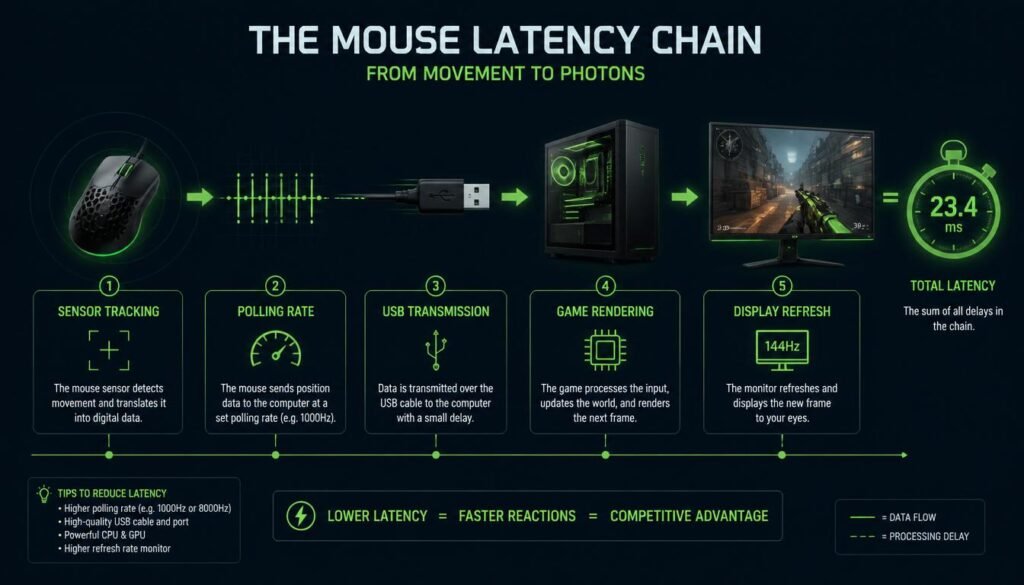
Here’s what most guides miss latency. Mouse latency is the total delay from hand movement to on-screen response. Think of it as a chain: sensor tracking, polling rate, USB transmission, game rendering. Polling rate is just one link.
That 125 Hz setting creates 8ms input lag. Jump to 1000 Hz and you slash it to 1ms. Is polling rate the same as dpi? No dpi affects speed; polling rate shrinks latency. The jump from 125 Hz to 1000 Hz is massive.
Which Matters More for Gaming?
Here’s the verdict polling rate wins. Upgrading from 125 Hz to 1000 Hz cuts input lag from 8ms to 1ms a massive difference you can actually feel. DPI? Most pros stick to 400–800 DPI anyway. Chasing 16,000 DPI won’t make you aim better.
In fact, extreme sensitivity can ruin precision by amplifying micro-movements. So if you’re wondering is polling rate the same as dpi, remember polling rate delivers responsiveness; dpi just changes speed. For competitive gaming, prioritize polling rate over chasing high dpi numbers.
What About eDPI? (Effective DPI)
Here’s something most guides skip eDPI. That’s Effective DPI, calculated by multiplying your mouse DPI by in-game sensitivity. Why does this matter? Because DPI alone doesn’t tell the full story.
Two players with different DPI can have identical eDPI and the same feel. For example, 800 DPI at 1.0 sensitivity equals 400 DPI at 2.0 both give 800 eDPI. So is polling rate the same as dpi? No. And eDPI proves DPI is just one piece of the puzzle.
Game-Specific Recommendations
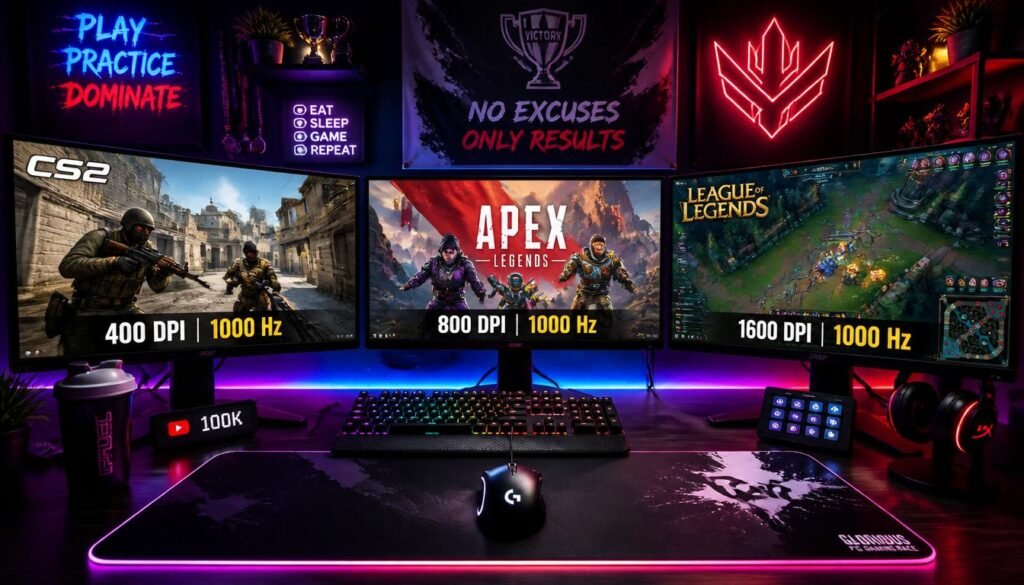
Different games demand different settings. For tactical shooters like VALORANT and CS2, stick to 400–800 DPI with 1000 Hz polling rate—precision matters most. Battle royales like Apex Legends work better at 800–1600 DPI for faster tracking.
MOBA players often prefer 1600–3200 DPI for quick cursor flicks across the screen. Casual gamers can stick with 800 DPI and 250 Hz. Remember, is polling rate the same as dpi? No. But finding the right balance for your game makes all the difference.
How to Change DPI and Polling Rate
Changing settings is simple. For DPI, most gaming mice have a dedicated button on top. For polling rate, open your manufacturer’s software—Logitech G HUB, Razer Synapse, or Corsair iCUE.
Here’s a quick setup: set DPI to 800, polling rate to 1000 Hz, disable mouse acceleration in Windows, and enable raw input in your games. Then fine-tune in-game sensitivity. Is polling rate the same as dpi? No. But adjusting both correctly transforms your gameplay instantly.
Mouse Acceleration and Raw Input
Here’s a setting most gamers overlook mouse acceleration. It makes cursor movement depend on both distance and speed, breaking muscle memory. Always disable it. In Windows, go to Control Panel → Mouse → Pointer Options and uncheck “Enhance Pointer Precision.
” Better yet, enable Raw Input in your games it bypasses Windows entirely for true 1:1 movement. Is polling rate the same as dpi? No. But fixing these settings alongside your DPI and polling rate ensures zero interference and pure precision.
Common Myths and Misconceptions
Let’s bust some myths. Myth one: higher DPI equals better aim. False—most pros use 400–800 DPI. Myth two: polling rate affects cursor speed. False it affects smoothness and latency.
Myth three: you need 8000 Hz polling rate. False 1000 Hz is plenty for 99% of players. Myth four: DPI and polling rate are the same.
We already know that answer is polling rate the same as dpi? No. Stop chasing marketing hype and focus on what actually improves your gameplay.
Pro Player Settings What the Pros Actually Use
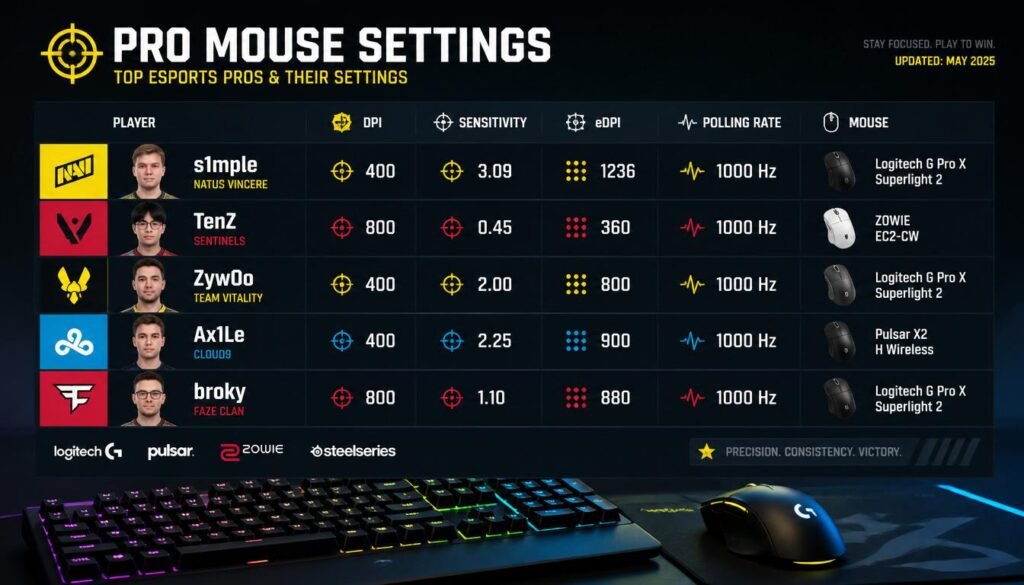
Want to know what the best players use? In CS2, pros like s1mple and ZywOo run 400 DPI at 1000 Hz. VALORANT stars like TenZ use 800 DPI with 1000 Hz polling rate. Apex pros often prefer 1600 DPI for faster tracking.
The pattern is clear almost none exceed 1600 DPI or chase 8000 Hz. So is polling rate the same as dpi? No. But pros prove that low DPI and high polling rate 1000 Hz deliver the perfect balance for elite performance.
How to Choose Your Perfect Settings
Start with a baseline 800 DPI and 1000 Hz polling rate. From there, adjust based on your game genre. Tactical shooters? Drop to 400 DPI. Battle royales? Bump to 1600 DPI. Fine-tune in-game sensitivity to hit your target eDPI typically between 200–400 for pros.
Test your aim in Aim Lab or Kovaak’s to find what feels natural. Is polling rate the same as dpi? No. But finding your perfect combination takes patience and once you do, stick with it.
Frequently Asked Questions (FAQ)
Is polling rate the same as DPI? No. They measure entirely different things.
Does higher DPI mean better aim? No. Most pros use 400–800 DPI.
What polling rate should I use? 1000 Hz is the gold standard for gaming.
Do I need 8000 Hz? Probably not. The improvement is minimal.
Can polling rate affect FPS? Yes. Higher rates consume more CPU.
How do I check my polling rate? Use a mouse rate checker tool online.
Does polling rate affect battery life on wireless mice?
Yes. Higher polling rates like 1000 Hz and 8000 Hz consume more power, draining wireless mouse batteries faster. For wireless gaming, 500 Hz offers a good balance between responsiveness and battery life.
Can I change polling rate without software?
Some mice have a dedicated polling rate button on the bottom. However, most gaming mice require manufacturer software like Logitech G HUB or Razer Synapse to adjust polling rate settings.
Is 500 Hz polling rate good enough for gaming?
Yes, 500 Hz provides 2ms response time—perfectly playable for most gamers. However, 1000 Hz offers 1ms response and is the recommended standard for competitive play.
Does mouse pad affect DPI or polling rate?
No. Your mouse pad affects tracking accuracy and sensor performance, but it doesn’t change DPI or polling rate settings. However, a quality mouse pad ensures your sensor tracks consistently.
Can I use different DPI for different games?
Absolutely. Many gaming mice allow you to save multiple DPI profiles. You can switch between them using the DPI button for different games or tasks.
Why does my mouse feel jittery at high DPI?
High DPI amplifies every tiny hand movement, making micro-adjustments feel shaky. This is why most pros prefer lower DPI like 400–800 for better control and smoother tracking.
Is polling rate the same as report rate?
Yes. Polling rate and report rate are interchangeable terms—both measure how often your mouse sends data to your computer per second.
Does Windows pointer speed affect DPI?
Yes. Windows pointer speed multiplies your DPI. For accurate 1:1 movement, set Windows pointer speed to 6/11 (the middle setting) and disable pointer precision.
What happens if I set polling rate too high?
High polling rates like 8000 Hz can consume significant CPU resources, potentially causing stuttering or FPS drops in CPU-bound games—especially on older systems.
Can I use 8000 Hz polling rate on any mouse?
No. Only high-end gaming mice with specialized sensors support 8000 Hz polling rate. Most standard gaming mice max out at 1000 Hz.
Does DPI affect in-game sensitivity?
Yes and no. DPI changes cursor speed globally, while in-game sensitivity multiplies that speed. Together they determine your eDPI (Effective DPI).
Why do pros use low DPI?
Low DPI like 400–800 allows for larger, more controlled arm movements. This builds consistent muscle memory and improves precision compared to tiny wrist flicks at high DPI.
Is there a noticeable difference between 500 Hz and 1000 Hz?
Yes. The jump from 500 Hz (2ms) to 1000 Hz (1ms) reduces input lag noticeably. Most gamers can feel the difference, especially in fast-paced shooters.
Does monitor refresh rate affect polling rate?
No, but they work together. A high refresh rate monitor (144Hz+) paired with 1000 Hz polling rate delivers the smoothest, most responsive gaming experience.
How do I know if my polling rate is working?
Use an online mouse rate checker tool. Move your mouse rapidly and check the reported Hz—it should match your configured polling rate.
Can I use different polling rates for different games?
Yes, if your mouse software allows profile-based settings. However, most gamers stick with one polling rate (1000 Hz) across all games for consistency.
Does DPI affect mouse acceleration?
No. Mouse acceleration is a separate Windows setting that modifies cursor movement based on speed, independent of your DPI setting.
What’s the best DPI for a 4K monitor?
1600–3200 DPI works well for 4K monitors since higher resolutions require more cursor movement to cross the screen. Adjust to your comfort.
Can polling rate cause connection issues?
Rarely. Some older USB ports or hubs may struggle with 8000 Hz polling rates. Always use a high-quality USB port directly on your motherboard.
Is 125 Hz polling rate bad for gaming?
Yes. 125 Hz creates 8ms input lag, which feels sluggish and unresponsive—especially compared to 1000 Hz at just 1ms. Upgrade to at least 500 Hz for gaming.
Conclusion
Let’s recap. Is polling rate the same as dpi? No—they’re completely different. DPI controls cursor speed; polling rate controls responsiveness. For competitive gaming, prioritize 1000 Hz polling rate over chasing extreme DPI numbers.
Start with 800 DPI, disable mouse acceleration, enable raw input, and build muscle memory. Stop overthinking specs and start playing. Your perfect settings are simpler than you think—stick with them and watch your aim improve.